I've had a lot of fun this week making a few boxes of gift cards that I'll be using for Christmas gifts. It's a really quick and inexpensive gift...and besides...everyone needs a card occasionally. I wanted to show you a couple of the boxes that I've made this week. I plan to make several more of these in the next few weeks.
The first set is the Christmas card gift pack. The card box will hold five cards and five envelopes easily. The cards were quick and easy to make and I really loved how they turned out. I used plain white cardstock (like from the office supply store). I cut each 8.5 x 11 sheet in half crosswise, which gave me two cards from each sheet of cardstock that measure 4.25 x 5.5 inches.
(BTW...I recently purchased a Scor-Pal...and it was perfect for this project, although not necessary)
For each of the cards, I stamped the Christmas design in black ink in the corner of the card and then added a word phrase approximately 1/2 inch from the edge of the card. Using template (cut it the same size as the card front, then cut a rectangle from the middle leaving 1/2 inch on each edge) or use the Tim Holtz zero center ruler. Using the ruler, I drew a solid black line 1/2 inch from the edge of the card. When I came to a spot that was stamped...I just skipped over it and resumed my line on the other side of the stamped image.


This next set of cards is a set of all occasion cards that I did the same way. The possibilities are endless...and honestly, they're just darn cute!


Now, here's the pattern for the adorable little box. (I must insert here, that this is not my original idea, I saw one at Splitcoast Stampers and I've tweeked it for my use.)

3. Cut the flaps as shown in this photo - by cutting away where the black is.

4. The shorter end at the top is the flap of the envelope box. You might want to round the corners on that and on the side tabs that fold in.
5. Fold on all scored lines.
6. Use very stick double sided tape to adhere the bottom flap to the tabs that fold in. (it folds just like an envelope.)
7. Decorate as desired. I used a small magnet under the flap and on the envelope to snap the box closed, but you could use ribbon adhered with brads to tie it together or a small piece of velcro on each side.
Use your imagination..and remember...it's QUICK, EASY, and INEXPENSIVE! (And it makes a great gift!)
I'd love to see what you make, so be sure to let me know when you try it. If you have questions, don't hesitate to ask me!
Hugs!


 My
My  I made this card from scraps I had left over from the kit this month. Super simple card and it works up really quickly!


 Lots of pretties this month! Be sure to check back next week!

 This is a photo I took of my Grandson, Jacob. My daughters and I took all the grandchildren out to the country. They were all dressed in denim and white. We had no particular destination in mind when we started out, we were just looking for a nice setting to take some photos. When we passed this farm, I thought it looked perfect for our photo shoot. So....we just stopped, walked up to the door and asked permission from the sweet little lady who lived there, grabbed our camera and headed out to the field! A really fun photo shoot!


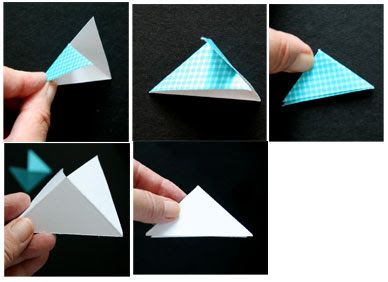
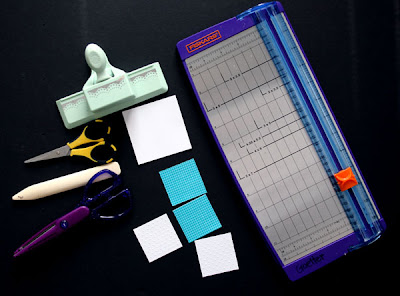 You will be cutting squares, so the larger the square, the larger the photo corner. For my examples, I cut several 2 inch squares and one 3 inch square. One way to use a bone folder is to align your opposing corners along the cutting groove in the trimmer and drag the bone folder down the grove. Some trimmers come with a scoring blade and that can be used as well. You will need to score your square from corner to corner - making and "X" design on the paper.
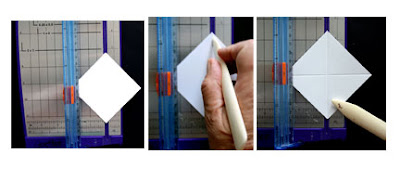 You can also do this by just folding the corners together and making a nice crisp edge on the fold with your fingers.

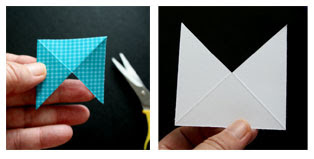 Once you've cut the ONE triangle out, simply fold the two edges on either side to the back and you've formed a little "pocket" that will slide over the corner of your photo. BUT...before you adhere the back pieces together, you might want to dress them up just a bit.
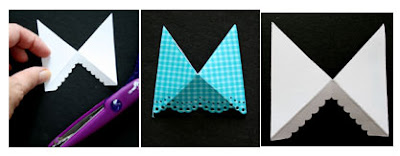
 If you want to add a decorative edge - use your edge punches, decorative scissors, or you could simply tear a tiny bit off the edge. Here, I've used some scalloped scissors to cut out part of my corner on the white piece, and I used a Martha Stewart punch on the edge of the gingham piece. One REALLY important part of this step is to make SURE that you punch/cut the side opposite the cut out notch. That's the side that will be on the top of the photo.
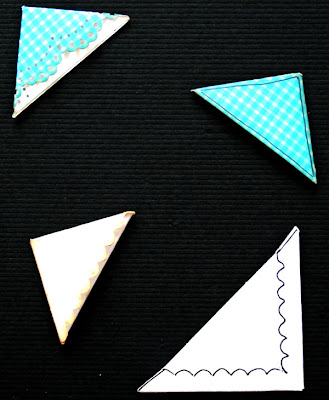
 You might also want to add a little ink to the edges or doodle on the front of the photo corner before glueing the two back edges together. I've added a little doodling to the examples below.
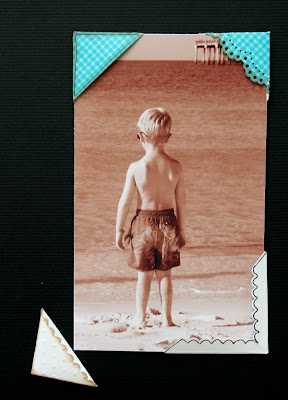
 So...now you have the finished project. I just put the different corners on the photo so you could get an idea how they might look. Dress them up or tone them down...it really depends on the look you're going for. Once you've decided where your photo will be on the layout, then all you have to do is put some adhesive on the back of each photo corner and place it on the page. This is really a good way to add photos to a page that you might not want to put adhesive on the actual photo (especially if it is a vintage photo).
 I hope you enjoyed this tutorial and find it useful. If you find this to be helpful, stop by and let me know. I always enjoy hearing from you! Happy Scrapping!